|
|
ISPF Edit Example
|
 |
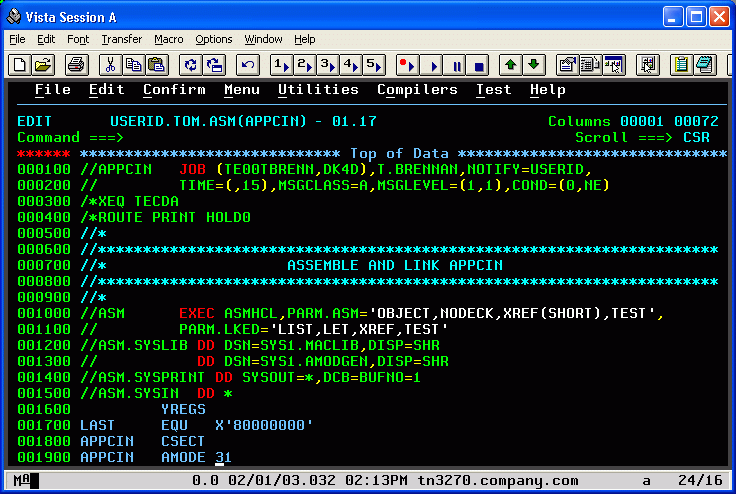
Items to Note:
-
The Windows Title Bar and Status Bar are user-definable. Variables are used to position information such as time, date, or other items in the order you want.
-
75 raster font sizes supplied with Vista are clear and readable, without the aberrations caused by re-scaling True-Type fonts.
-
Normally the row/col indicator at the lower right of the screen shows the location of the cursor on the screen. But in ISPF edit or browse, Vista calculates the real dataset column based on the current left/right scroll position - 16 in the example above. Quicker and easier than the ISPF COLS command.
-
Extended colors are supported, so you can use the HILITE ISPF command effectively with Vista. 16 colors are available on the screen at any one time, and can be chosen from a palette of 16 Million.
-
The cursor can be set to various sizes and styles, to blink or not blink, and to change shape when inserting characters. Just one of the many details you'll find throughout the Vista TN3270 product.
|
|
|

