|
|
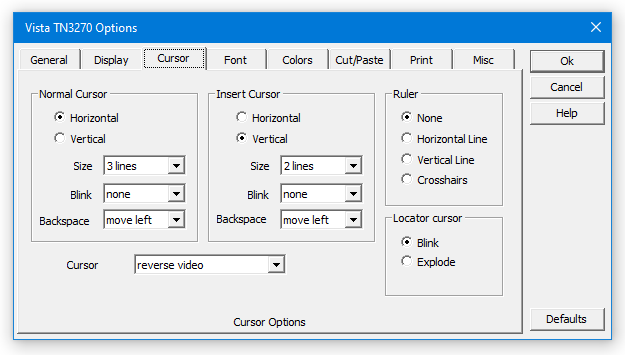
Cursor Options
|
  |
|
Items to Note:
-
The cursor can be set to various absolute sizes (such as 3 lines as shown above), or it can also be set to a size relative to the current font size, such as a full block, or 1/4 block. It can also be set to be horizontal or vertical, and to blink at 2 speeds (or of course, not to blink at all).
-
You also can define different characteristics for the cursor when in "insert" mode. The defaults are a horizontal normal cursor, and a vertical insert cursor.
-
Crosshairs or rules can be defined to follow the cursor. And the crosshair color can be changed on the Colors option panel, to make them stand out, or make them barely visible.
-
The "Locator Cursor" function can be set to blink the cursor fast, or "explode" it (make it grow big for a moment) - to help you find it on busy screens.
-
Cursor color can be set to follow character or field color, or to black and white for greater visibility.
|
|
|

